indigitall Omni AI
  Start chat with AI agent
 Speak with AI voice agent
 Book a Demo

 Speak to an Expert












How to Integrate Customer Journey Orchestration with Salesforce Marketing Cloud (and which system owns the journey afterwards)
August 20, 2026



Updated September 13, 2026
Yes, you can integrate a customer journey orchestration layer with Salesforce Marketing Cloud, and the connection itself is the easy part: authenticate with API credentials, map the fields that identify a customer, build the journey, test it against real records and then watch two or three numbers for ninety days. What decides whether the integration still works in eighteen months is a question nobody puts on the project plan: once both systems can run a journey, which one owns it. Answer that before you connect anything, because the failure mode is not an error message. It is two systems quietly sending the same customer two different next steps, and nobody noticing until the complaints arrive.
This guide is for marketing operations, CRM and lifecycle leads who already run Salesforce Marketing Cloud and are adding an orchestration layer on top of it. You will get the five connection steps in order, the decision that has to be made before step one, what actually crosses between the two systems, how to tell in ninety days whether it worked, what breaks at six months, and the two situations where this integration is not worth doing.
Can you integrate customer journey orchestration with Salesforce Marketing Cloud?
Yes, through its APIs, and the integration is well traveled.
Marketing Cloud exposes REST and SOAP APIs for contacts, data extensions and journey triggers, which is everything an orchestration layer needs to read a profile, write an event and fire a step. Any platform that can hold an OAuth credential and speak to those endpoints can be connected, and most of the work is not code.
What varies wildly is what you do with the two journey engines you end up owning, which is the part this guide spends most of its time on.
What has to be decided before you connect anything?
Three things, and only one of them is technical.
Which system owns the journey. Marketing Cloud has Journey Builder. Your orchestration layer has its own. Both can send. If you connect them without deciding, you will end up with journeys in two places, each unaware of what the other just sent, and the customer receiving both. This is the decision that predicts everything else, and it takes one meeting.
What the single identifier is. Contact Key in Marketing Cloud has to resolve to the same person as the identifier your orchestration layer uses. If one system keys on email and the other on phone, you do not have an integration: you have two databases that occasionally agree. How that resolution works is explained in identity resolution: how a CDP turns fragmented profiles into one customer.
What each field is for. Not which fields exist, which is a mapping exercise, but what each one is going to be used to decide. A field that nobody will ever act on is a field that will be wrong in six months and will cost you the time of finding that out.
How do you connect the two, step by step?
Five steps. None of them takes long once the three decisions above are made.
Step 1: Generate and store the API credentials
Create an installed package in Marketing Cloud with the API integration component, scoped to only the permissions the orchestration layer actually needs: read contacts, write data extensions, fire journey events. Scope it narrowly on the first pass, because widening a permission later is a ticket and narrowing it after an audit is a project.
Store the client ID, client secret and tenant subdomain in the secret manager your company already uses. Not in the platform's settings screen, and not in a shared document. The credential outlives the person who created it, which is exactly why it has to live somewhere that survives them.
Step 2: Map the data fields
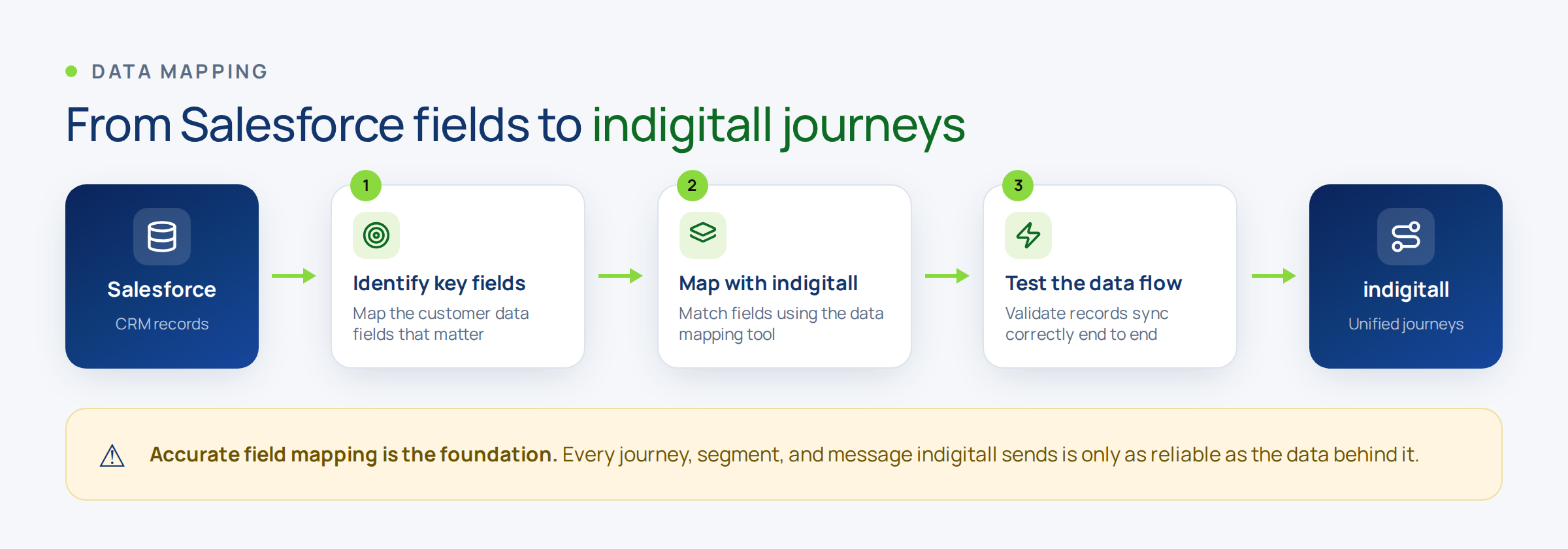
Map the identifier first and everything else second. Contact Key to the orchestration profile ID, then attributes, then behavioral events.
The field that causes the most trouble is the phone number, because Marketing Cloud will happily store it in four formats and an orchestration layer matching on it needs one. Normalize it with the country prefix on the way in, not on the way out.
Write the mapping down somewhere a person can read it. Not because anyone enjoys documentation, but because the person who revisits this in a year will not be you.
Step 3: Build the journey on the side that owns it
Whichever engine you decided owns the journey, build there and let the other one observe. In practice that means one system decides the next step and the other receives the outcome as an event.
The anti-pattern is splitting a single customer journey across both engines because each does one part slightly better. It works in the demo and produces the double-send in production.
Step 4: Test against real records, not test accounts
Create the test accounts, yes, and then run the journey against a sample of your actual contacts in a controlled audience. Test accounts are clean by construction and your data is not, so a test account proves the pipes work and proves nothing about the outcome.
What you are looking for in this step is duplicates, contacts that resolve to two profiles, and fields that arrive empty. Finding one duplicate here costs five minutes. Finding it in month eight costs a merge project.
Step 5: Watch three numbers for ninety days
Not the dashboard, three numbers. Set them before you launch and write down what each one should do:
- Profile resolution rate: what share of incoming events attach to an existing profile rather than creating a new one. If this drops, your identifier is failing.
- Time from event to next step: how long between the customer doing something and the journey reacting. If it grows, something is queueing.
- Send overlap: how many customers received a message from both engines in the same window. Should be zero, and if it is not, the ownership decision did not stick.
"Indigitall offers a fast, seamless setup, enabling easy testing and integration with Power BI for quick report updates. The tool enhances service efficiency with features like chat attention limits and smooth chat transfers.", Verified User in Telecommunications on G2
This verified user in telecommunications names testing and reporting in the same breath, which is the right pairing for an integration project. The setup is rarely what goes wrong. What goes wrong is that nobody can see what the two systems did afterwards.
Which system owns the journey once both can run one?
This is the question the integration guides skip, and it is the one that decides how this looks in two years.
There are only three workable answers, and all three are defensible. What is not defensible is not choosing.
| Model | Who decides the next step | Best when | What it costs you |
|---|---|---|---|
| Marketing Cloud owns it | Journey Builder | Your campaigns, templates and approvals already live there and the team is trained | Real-time reaction is limited to what the platform can trigger on |
| The orchestration layer owns it | The orchestration engine, on the unified profile | Moments that repeat and depend on behavior across channels | Marketing Cloud becomes an execution channel, and some teams resist that |
| Split by moment type | Both, on a written boundary | Campaign sends in one, triggered journeys in the other | Requires discipline: the boundary has to be written and enforced |
The third looks like a compromise and is the one that fails most often, because the boundary is agreed in a meeting and never written down. If you pick it, put the boundary in the same document as the field mapping.
Gartner tracks this category separately from campaign tooling precisely because the two do different jobs, which is worth knowing when you are defending the budget: the customer journey analytics and orchestration market is not the same purchase as a campaign platform, even when one vendor sells both.
What data crosses between the two systems, and what ages fastest?
Three kinds, and they behave very differently.
| Data | What it is for | Who maintains it | When it goes stale |
|---|---|---|---|
| Identity attributes | Resolving the person to one profile | The system of record, declared before you connect | When someone changes job, email or number |
| Behavioral events | Deciding what the next step should be | Written automatically, never edited | Within days, and that is the point |
| Consent and preferences | Deciding what may be sent at all | Marketing, with a review date | Six months, silently |
There is no universal right answer to the middle column. What matters is that each field has one declared owner, written down before the connection is made, because a field owned by both systems is a field owned by neither.
The third row is where the risk sits. Consent captured for one purpose in one system does not automatically cover a different purpose in the other, and a preference collected eight months ago is not a preference any more, it is an assumption with a timestamp.
"Indigitall has improved our audience connection with intuitive push notifications, precise segmentation, and real-time campaign launches. It's crucial for media outlets needing immediacy and personalized messaging.", Alberto P. on G2
Alberto P. puts segmentation and real-time launches together, and that combination only exists when the profile is shared. Segmentation on stale attributes launched in real time is just a fast mistake.
How do you know the integration worked?
By what changed for the customer, not by what appears on a dashboard.
The three numbers from step five tell you the plumbing is sound. What tells you the project paid for itself is narrower: did a moment that used to take a scheduled send now happen when it should, and did that show up anywhere.
Sanitas cut no-shows by 60% with omnichannel reminders, which is the cleanest example of this because a reminder only works if it lands at the right time on the channel that person actually reads. Grupo Xcaret collected 720,000 new opt-ins through web push by asking at the moment of intent rather than on a schedule. Neither number comes from the integration. Both come from what the integration made possible.
The 71% of consumers who expect personalized interactions, according to McKinsey's Next in Personalization report, do not care which engine sent the message. They notice when the two disagree.
Where does this integration break at six months?
In the mapping and in the ownership boundary, and neither one raises an error.
Somebody adds a field in Marketing Cloud, or renames one, or starts using an existing field for something else. The sync does not fail. It keeps working perfectly, moving the wrong value, and you find out when a number looks odd.
The ownership boundary erodes the same way. A campaign gets built in the engine that was supposed to be observing, because it was faster that day. Then another. Six months later nobody can say which system sends what, and the send overlap number is the only thing that would have caught it.
What keeps this integration alive at two years is a named person who reviews the mapping and the boundary when either system changes, not the architecture. Not a department, a name, with it inside their objectives.
What does it cost to run for a year?
The license costs are the ones you already know. The two that are not on the sheet are the ones that decide the business case.
The first is your own team's hours: reviewing the mapping, resolving duplicates, refreshing consent, and adjusting the journey when the product or the policy changes. That is monthly work from month one, not a launch cost.
The second is the messages that go out wrong, to duplicated profiles or on stale preferences. They bill the same as the good ones and they subtract, because the customer who receives the wrong thing twice does not distinguish between your two engines.
There is a third variable nobody models before signing: what share of your journeys are genuinely triggered by customer behavior versus scheduled. If most of your volume is scheduled, an orchestration layer is a nice-to-have. Where the volume is triggered instead, it is the whole point.
When is this integration not worth doing?
In two situations, and they are worth saying out loud before the project starts.
When nobody will own the mapping. Without a named person, the integration will work for six months and then tell an increasingly untrue story about your customers. That is worse than not having it, because the decisions keep getting made on that data.
When the customer profile is not resolved yet. If a meaningful share of your contacts exist twice, connecting a second engine multiplies the problem instead of revealing it. Fix identity first. The orchestration layer will be worth far more afterwards, and the project will be shorter.
Where indigitall fits, and where it does not
indigitall runs the orchestration layer on a shared customer profile across push, email, SMS, WhatsApp and voice, and connects to Marketing Cloud through its APIs so that one engine decides the next step and the other executes on the channels it already owns. For a team that has decided orchestration owns the journey, that removes the send-overlap problem structurally rather than by discipline. The shared profile is described on the customer data platform page, and the orchestration side on customer journey.
Where it does not fit: a team whose journeys are almost entirely scheduled campaigns is buying reaction speed it will not use, and would get more from tightening segmentation inside the tooling it already has. And a company that has not resolved identity should not add a second engine yet, for the reason above.
If you are still comparing approaches, this piece covers customer journey orchestration versus multichannel campaigns, this one covers how orchestration differs from traditional marketing automation, and this one walks through how to create personalized campaigns using orchestration. For the category view there is a complete guide to journey orchestration platforms and the roundup of the most effective orchestration tools. If the loop between data, AI and action is what you are designing, there is the data, AI and action loop with Salesforce CRM, and for keeping several channels consistent, the omnichannel bridge.
"Indigitall simplifies mass messaging with detailed metrics and campaign history, helping optimize send times and message appeal. The easy setup and attentive support make it a valuable marketing tool.", MARIE DAYANA E. on G2
MARIE DAYANA E. mentions campaign history, which is the least glamorous item on this list and the one that matters most after an integration. When two engines can send, the history is the only place where you can reconstruct which one did.
FAQs: integrating customer journey orchestration with Salesforce Marketing Cloud
Can I integrate customer journey orchestration with Salesforce Marketing Cloud?
Yes. Marketing Cloud exposes REST and SOAP APIs for contacts, data extensions and journey triggers, which is what an orchestration layer needs to read a profile, write an event and fire a step. The connection is five steps and takes days. What takes a meeting, and decides the outcome, is agreeing which of the two engines owns the journey once both can run one.
What do I need before starting the integration?
Three decisions and one credential. The decisions are which system owns the journey, what the single customer identifier is on both sides, and what each mapped field is going to be used to decide. The credential is an installed package in Marketing Cloud scoped to only the permissions the orchestration layer needs, stored in your secret manager rather than in a settings screen.
Which system should send the message, Journey Builder or the orchestration layer?
Whichever one you decided owns the journey, and only that one for a given moment. The three workable models are Marketing Cloud owning it, the orchestration layer owning it, or splitting by moment type with a written boundary. The split is the one that fails most often, because the boundary is agreed verbally and never documented.
How do I know if the integration is working?
Watch three numbers for ninety days: the profile resolution rate, which tells you whether your identifier holds; the time from customer event to next step, which tells you whether anything is queueing; and the send overlap, which should be zero and tells you whether the ownership boundary is being respected.
Why does the integration stop working after six months?
Because someone renames or repurposes a field and the sync keeps working, moving the wrong value without raising an error, and because the ownership boundary erodes when a campaign gets built in the engine that was supposed to be observing. Both are prevented the same way: a named person with the mapping review inside their objectives.
When is this integration not worth doing?
When nobody will own the mapping, because the data quietly degrades while decisions keep being made on it. And when the customer profile is not resolved yet, because connecting a second engine on top of duplicated contacts multiplies the problem instead of exposing it. Fix identity first and the project gets shorter and worth more.
About the Authors