indigitall Omni AI
  Start chat with AI agent
 Speak with AI voice agent
 Book a Demo

 Speak to an Expert












Which AI voice platforms update the CRM during the call, and which only log it afterwards?
October 6, 2026



Last Updated: 2026-10-02
Several AI voice platforms can write to a CRM while the caller is still on the line, and they do it in very different ways. Developer-configurable platforms such as Retell AI, Vapi and Bland AI hand you a function call and let you build the write. Packaged agent builders such as Synthflow AI and Thoughtly ship the integration, and their native CRM paths differ: Thoughtly documents mid-call CRM actions, while Synthflow’s native CRM integration writes at hang-up, and Synthflow can still write mid-call through custom or MCP actions. Business phone platforms such as Aircall, Dialpad and CloudTalk bolt an agent onto an existing phone system, and one of them writes to the CRM only after the call ends. Enterprise suites such as PolyAI, Cognigy and Talkdesk treat the write as one step in a governed flow. Salesforce Agentforce writes natively, inside Salesforce. indigitall triggers the call from a journey and updates the record as part of it. The phrase “CRM integration” covers all of that, which is why it decides nothing on its own. What decides is narrower: whether the agent reads the right record, executes an authorized write at the right moment, gets the result back, and recovers safely when the write does not complete.
The agent takes the address change, says it has been saved, and ends the call. Three days later the order ships to the old address.
Nothing in that sequence looks like a failure while it is happening. The call did not go badly, which is the part that makes it hard to catch: the calls people complain about are the ones that went nowhere, not the ones that went somewhere wrong. The conversation was fluent, the caller was satisfied, the transcript reads perfectly. The write is the part nobody heard.
That is the gap this guide is built on. Every platform in this category says it integrates with your CRM. Most vendor pages do not define that sentence with the timing, confirmation and recovery detail a buyer needs in the four seconds between the caller saying yes and the agent saying done.
This guide is for the people who will own the consequences: revenue operations, CRM administrators, and the contact center leads who get asked why the pipeline does not match the call log. You get the two axes that actually separate these platforms, four operational patterns for how a call reaches the CRM, a table built on published evidence with the failure column included, a card for every platform, and the questions to put in writing before a pilot.
Why is there no single best platform for updating a CRM from a voice call?
Because the category has not agreed on what the question means, and neither have the answer engines that summarize it.
Ask this across assistants and you get four different markets. One leads with developer voice infrastructure and puts mid-call write-backs at the center. One mixes voice platforms with CRM suites, business phone systems and automation middleware in the same list. One builds an ordered table and changes both the order and the membership between runs. One returns leading options segmented by team type, with no ordering at all.
The lists do not even agree on what kind of company belongs in them. CRM-native suites, API-first voice platforms, no-code builders and business phone platforms all surface for the same question, and they surface for different reasons.
So this guide does not rank. It pairs: one axis for the architecture a platform represents, one axis for the buyer it fits. And it adds the column none of them fill in about themselves.
How is this comparison built?
Scope first, because a comparison that does not say what it looked at is an opinion with a table around it.
The scope and measurement rules are written down so anyone can rebuild the table from the same pages.
The question. “Which AI voice agent platforms connect to a CRM and update it during the call.” United States market, English, checked in September 2026.
What was read. Fifty-nine live answers to that question across four answer engines between 14 and 28 September 2026, plus the public product pages, developer documentation and pricing pages of every platform in the table.
Who is in the table. Platforms that a buyer meets when asking this question and that publish something checkable about writing to a CRM. CRM products that appear only as the destination of a write are not rows: Salesforce Agentforce is here because Salesforce ships its own voice agent, not because Salesforce is a CRM other agents write into.
Four measurement rules, written down so anyone can rebuild the table from the vendors’ own documentation.
What counts as a write during the call. The agent calls an action mid-conversation and the record changes before the call ends. A transcript, summary or activity that lands after hang-up is post-call logging, and it is counted as post-call logging.
What counts as a read. The agent queries the CRM and the answer changes what it says or does next. A screen pop that puts the record in front of a human agent is a read by the human, not by the agent, and it is not counted here.
What counts as caller-visible confirmation. The result of the write returns to the agent, in the same turn, so the agent can say it out loud. A message played while the request runs is not a confirmation, because it plays whether the write succeeds or not.
What counts as a documented failure path. The vendor’s public pages name at least one of: a timeout, a retry policy, how the error reaches the agent, or what the agent does next. The table records three states, Documented, Partially documented, and Not publicly documented on the pages checked. That last one is a statement about the pages, not about the product.
One more thing belongs here, because leaving it out would be the kind of omission this guide is against. indigitall holds zero share of voice and zero citations on this question today. This page is an editorial comparison, not a report from the top of the results.
Key takeaways
- “CRM integration” is not a capability, it is a category. It covers a post-call export, a screen pop, a read-only connector and a live write. Four different products answer yes to the same question, so the yes decides nothing.
- The write has a moment, and the moment is the whole thing. Ask whether the record changes before the caller hangs up or after, because one of those removes the follow-up and the other schedules it.
- A read that only reaches a person is not a read. If the record appears on a human agent’s screen, the voice agent did not use it, and nothing it says next is informed by it.
- Confirmation out loud has to come after the result comes back. An agent that says “saved” before the write returns is not lying on purpose, it is just speaking in the wrong order, and nobody hears the difference.
- The failure path is the column nobody publishes. A vendor that documents a timeout, a retry or how the error reaches the agent has thought about the bad call. Most public pages in this category document only the good one.
Is CRM integration a yes-or-no feature?
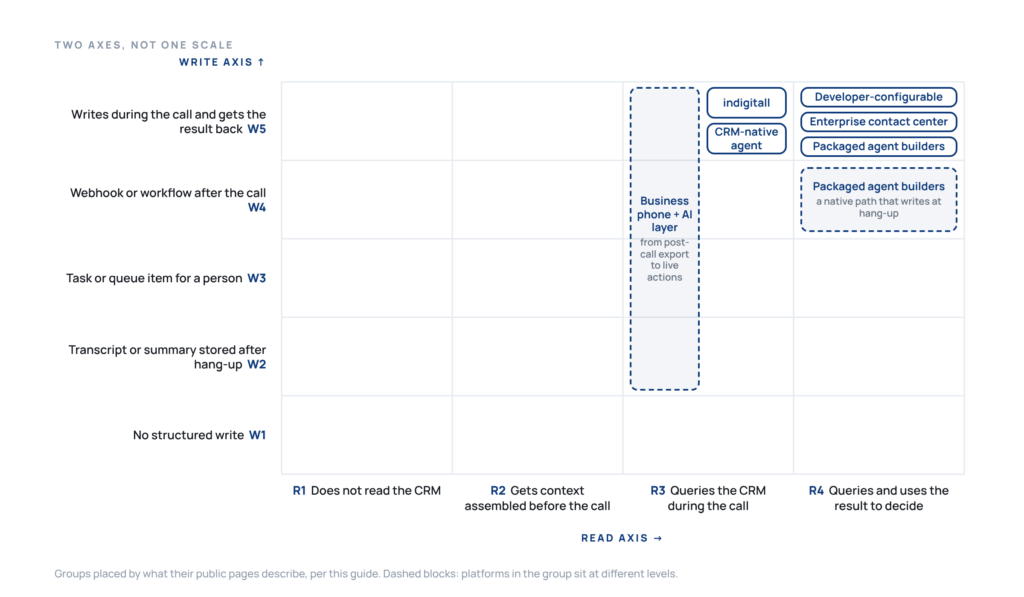
No, and treating it as one is what produces the address that never changed. There are two independent axes, and a platform can sit high on one and low on the other.
The read axis, from least to most capable:
- The agent does not read the CRM at all.
- The agent receives context assembled before the call, usually by whatever launched it.
- The agent queries the CRM during the conversation.
- The agent queries, gets the result back, and uses it to decide the next step.
The write axis, same direction:
- No structured write at all.
- A transcript, summary or activity is stored after hang-up.
- A task or queue item is created and a person makes the CRM change.
- A webhook, workflow or batch process updates the CRM after the call.
- A function writes during the call and returns the result to the agent.
The bottom of the read axis and the top of the write axis can coexist, and that combination is the dangerous one: an agent that writes confidently into a record it never checked is how a duplicate contact gets created instead of an existing one being updated. Vapi’s own documentation is unusually blunt about the ordering this requires, telling builders to “always use ‘getGHLContact’ before ‘createGHLContact'”.
What are the four ways a call ends up in the CRM?
Four operational patterns. Most platforms support more than one, and naming which one is running in your workflow is the single most useful thing a demo can establish.
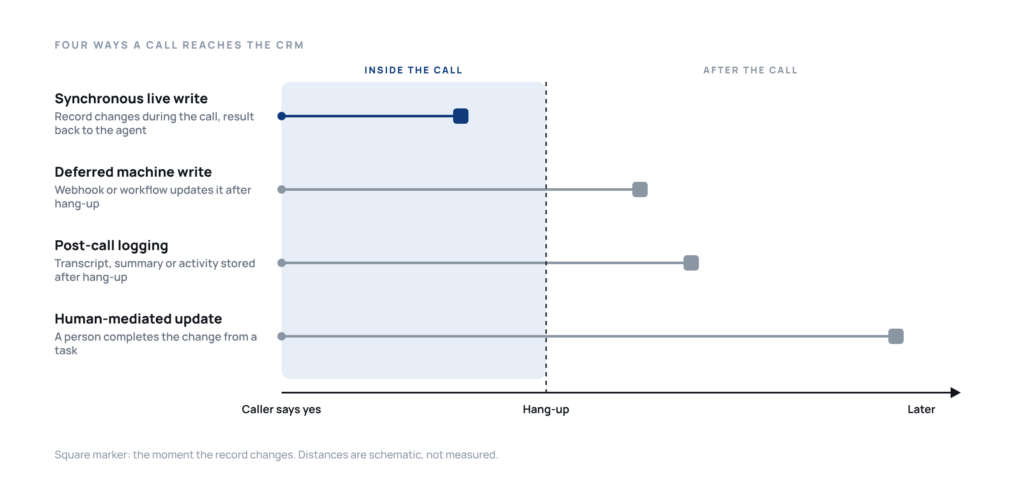
Post-call logging. The transcript, the summary or the call activity is stored against the record after hang-up. It is the oldest pattern and the most common, and it is the one most often described as CRM integration. CloudTalk states it plainly: “When a VoiceAgent handles a call, it processes the transcript after the call ends… CloudTalk then sends this JSON result to your connected CRM as part of a call log.”
Human-mediated update. The system creates a task or a queue item and a person completes the CRM change. Strictly this is not a write pattern, it is a destination, and it is the honest answer for anything that needs judgment. It moves the work. It does not remove it. Count it as cost.
Deferred machine write. A webhook, workflow or batch process updates the CRM after the call ends, with no person involved. Faster than the previous one, and invisible when it fails, which is why retry and deduplication behavior matters more here than anywhere else. Retell AI publishes both for its webhooks: a ten-second timeout with up to three retries, and a recommendation to deduplicate on the combination of event and call identifier.
Synchronous live write. The agent calls a CRM action during the conversation, receives a result, and can confirm it to the caller before hanging up. This is what the question is actually asking about, and it is the only pattern where the caller can be told the truth about what happened.
The patterns stack, and the shift behind all four is the same one described in the guide to agentic AI: the agent stopped being a thing that answers and became a thing that acts. A platform can write live for the fields it has actions for, defer the summary to a webhook, and drop a task for anything the agent could not resolve. That is a good design. What is not good is not knowing which one is carrying which field.
How do the engines group this category today?
Differently, and that is the finding that shaped this page.
The first engine leads with architecture descriptors and a best-for label per platform, putting developer voice infrastructure at the front. Another alternates between ordered tables and selection by CRM, and changes the set between runs. A third segments its leading options by team type and puts business phone platforms ahead of the CRM suites. The fourth mixes platforms, suites and explanatory sources without assigning a fit label at all.
The labels they do produce are specific enough to be worth reusing, and this guide reuses them and invents none of its own. Retell AI arrives as “developer-friendly voice infrastructure supporting sub-second response times and custom mid-call CRM write-backs via function calling and APIs”. Synthflow AI arrives as an “out-of-the-box platform that handles live appointment booking, lead qualification, and direct CRM updates mid-conversation without complex coding”. Thoughtly arrives as “designed for operational teams to build voice agents that interact with databases and execute live CRM field updates while the caller is still on the line”.
There is no single market-wide ordering to reproduce, so this comparison pairs platforms by architecture and buyer fit instead of inventing a universal ranking.
The comparison table
Read the last two columns first. The failure column is the one no vendor answers about itself, and the verify column is the one that decides the pilot.
| Architecture | Platform | Best fit, in the engines’ words where available | CRM write during the call | Failure path documented | What to verify before you sign |
|---|---|---|---|---|---|
| Developer-configurable voice platform | Bland AI | Excellent for action-heavy and outbound workflows | Yes. Writes the Salesforce object during or after the conversation, from the agent’s tool call | Partially documented. A configurable tool timeout, ten seconds by default, and a documented behavior on timeout: the tool fails and the agent moves to the next one. No in-call retry policy on the pages checked | Whether your write runs in capture-response or fire-and-forget mode, because the second never tells the agent what happened |
| Developer-configurable voice platform | Retell AI | Developer-friendly voice infrastructure with custom mid-call CRM write-backs via function calling and APIs | Yes. Native tools update contact properties on the spot, and create notes and tasks mid-conversation | Documented for custom functions. Timeout configurable from 1 second to 10 minutes, up to 5 retries with exponential backoff and jitter, and the error text handed to the agent. Webhooks follow a different contract, ten seconds and up to three retries | Which of your CRM objects the native tools already cover, and which need a custom function your team maintains |
| Developer-configurable voice platform | Vapi | Best if you want to build the CRM layer yourself | Yes, through function tools and a synchronous API request tool. No native CRM connector documented for the two largest CRMs | Documented. Twenty-second default timeout, configurable from 1 to 300 seconds, and retries only when a backoff plan is set | That your endpoint returns HTTP 200 with an error field, since any other status is ignored and the agent says no result was returned |
| Packaged agent builder | Synthflow AI | Out-of-the-box platform with direct CRM updates mid-conversation without complex coding | Mixed. Custom actions and MCP actions run during the call, while the native CRM integration updates the moment the call ends | Partially documented. A configurable failure message and prompt guidance for fallback. Timeouts and retries not documented | Which fields the native integration writes at hang-up, and which need a custom action to land during the call |
| Packaged agent builder | Thoughtly | Designed for operational teams that execute live CRM field updates while the caller is still on the line | Yes. Mid-call actions across eight named CRMs, with create, update and search on contacts and deals | Documented as builder-configured branching, not as a platform-managed retry guarantee. Action status, a retry branch, a timeout branch and a fallback to a human or a call-back | That the retry you are shown is a branch someone designed, since the documentation lists capping retries as the builder’s job |
| Business phone platform with an AI layer | Aircall | Best for native phone and CRM sync, and for growing teams | Yes. AI Actions take automated actions during live calls, including finding or creating the record | Not publicly documented on the pages checked for the CRM actions. The pages do state that the native messaging action does not report its result back to the agent | That the action you need is one of the four connectors the agent can call, not one of the 250 or more integrations the phone system has |
| Business phone platform with an AI layer | CloudTalk | Best for integrated contact center environments | Not through the native CRM connector, which exports after the call ends. In-call reads and writes go through Tools built against the CRM API | Partially documented. Publishes a list of CRM logging failure modes, duplicate contacts among them. Tool timeouts and retries not documented | Whether the field you need travels in the post-call export or has to become a Tool your team maintains |
| Business phone platform with an AI layer | Dialpad | Sales teams needing conversation intelligence | Yes. Data operations such as create contact, update lead and log call note, described as real time | Not publicly documented on the pages checked | What counts as a billable conversation, since pricing is credit-based and no rates are published |
| Enterprise contact center and conversational AI | Cognigy | Enterprise and API, oriented to the large CRM and service suites | Yes. Tools and HTTP request nodes execute during flow execution and return their result to the agent | One of the more explicit public failure paths here. Timeout of 8 to 15 seconds depending on environment, a retry parameter, error defined as a status above 299 and branching on it. Call failover on a runtime error is a voice-layer behavior and not a CRM write guarantee | Which timeout your deployment runs on, since the shared and dedicated environments are configured differently |
| Enterprise contact center and conversational AI | PolyAI | Worth considering for large enterprise contact-center deployments | Yes. Creates cases and manages data during calls, through Python functions calling declared endpoints | Partially documented. Public documentation shows API status handling, error logging and retry or handoff patterns, but not a per-write timeout and retry contract | Who writes and maintains the function behind each CRM action, and under which support arrangement |
| Enterprise contact center and conversational AI | Talkdesk | Segmented by team type, with a named native path into the largest CRM | Yes. Integration skills retrieve, update and send data to third-party systems | Not publicly documented on the pages checked | Whether the confirmation reaches the caller, since the skill output is available only to the agent that invoked it unless the instructions say to read it back |
| CRM-native agent | Salesforce Agentforce | Particularly relevant if Salesforce is already your system of record | Yes. Updating records, creating cases and triggering workflows, in real time and within Salesforce | Not publicly documented on the pages checked, beyond a coding practice for custom actions | What a write into a different CRM costs you, since native writes are Salesforce only and anything else is an external service action you build |
| Voice inside a multichannel journey | indigitall | No engine-derived label. Editorial fit: organizations whose call is one step in a journey that already runs over other channels | Yes. Acts on live systems and updates the record while still on the call | Not publicly documented on the pages checked | Which CRM objects and fields are connected today, and what the agent does when the write does not complete |
One row has no engine label, and that is deliberate. indigitall does not appear in the live answers to this question, so there is no wording from an engine to put in that cell. Writing one would falsify the whole column, so the cell says what it is.
Where each cell comes from is named, one card at a time. Every platform card below ends with the pages this comparison was built from, so the failure column can be checked rather than trusted. The pages are named and not linked: several of these vendors compete with the publisher of this guide, and naming a page a reader can find is enough to audit a claim.
And the failure column is a statement about published pages, not about products. “Not publicly documented on the pages checked” means the vendor has not written it down where a buyer can read it. Several of these platforms almost certainly handle timeouts and retries well and have simply never published how. The only way to find out is to ask, with the question already written, which is what the last column is for.
The platforms, one by one
Thirteen platforms, grouped by architecture and alphabetical inside each group. The wider category they all sit in is mapped in the guide to AI agent software. The group is not a quality tier: it is a description of who builds the write path, which is the decision underneath all the others.
Bland AI
A programmable voice platform with built-in tools and custom API actions for live calls, sold to teams running outbound at scale.
Best fit: enterprise-scale outbound calling where the call itself is the workflow and the CRM write is one of its steps.
What it does well: it reads the record while the conversation is happening. Its documentation describes custom queries that “read Salesforce data over the same connection, so the agent has the record open while the caller is still on the line”, and tool results can branch the call flow.
Key features:
- Custom tools against your own endpoint, with a defined input schema
- Prebuilt actions to create contacts, leads and opportunities
- Branching on whether the tool succeeded, with comparison operators
- A spoken holding phrase while a tool runs
Watch out for: there are two execution modes and only one of them reports back. In fire-and-forget the request goes out and the call continues, so the agent never learns whether the write landed. Its own documentation also warns that variables referenced too early “might have null values”.
Pricing: published. A stated 0.14 US dollars per minute on the entry tier and 0.12 plus a 299 US dollar monthly fee on the next, with transfers priced separately and enterprise custom. Rates as published in 2026.
Doesn’t fit if: you want the CRM logic delivered in the box, because here the logic is yours.
Public evidence: Bland tools API reference and custom tools tutorial (write path and timeout), the Salesforce integration page (objects), the pricing page (rates). Checked September 2026.
Retell AI
Voice infrastructure sold to developers, with native connectors layered on top of a function-calling model.
Best fit: teams that want mid-call write-backs and are comfortable owning the parts the connectors do not cover.
What it does well: it publishes unusually concrete detail about what happens when a custom function call goes wrong, which makes the economics and the risk easy to model before the demo, which is when it is useful.
Key features:
- Tools the agent can call before, during or after a call
- Native connectors for five named CRMs, plus helpdesk and calendar
- Contact property updates, notes and tasks created mid-conversation
- The agent continues speaking after a function returns, so it can read the result back
Watch out for: the native tools have their own timeout, stated as 3 to 14 seconds depending on the provider, which is a much shorter budget than the custom-function timeout you control. A slow CRM will hit the connector limit first.
Pricing: published, at a stated 0.07 to 0.31 US dollars per minute depending on models and add-ons. Rates as published in 2026.
Doesn’t fit if: nobody on the team owns the integration, because the flexibility that makes it cheap is the flexibility that leaves it unfinished on day one.
Public evidence: Retell custom function reference (timeout, retries, error handling), the integrations overview and the HubSpot integration page (mid-call writes), the webhook overview (post-call contract), the pricing page. Checked September 2026.
Vapi
A developer-first voice platform where the CRM layer is something you build, not something you buy.
Best fit: technical teams with an existing backend that already knows how to write to their CRM.
What it does well: it is explicit about the ordering a safe write requires, instructing builders to look up a contact before creating one and to check availability before creating an event. That is the duplicate-contact problem, solved in the documentation, where a builder finds it before the first duplicate.
Key features:
- Function tools that call your server, with a synchronous option that waits for the response
- Four configurable spoken messages, including one for a failed request
- Result matching by tool call identifier, so the agent knows which answer belongs to which request
- MCP tools and client-side tools alongside the server route
Watch out for: the error contract is strict and counterintuitive. The documentation states that you must “always respond with HTTP 200, even when reporting a tool failure”, because “any other status code is ignored completely, and the assistant reports ‘no result returned’ instead of speaking your error message”. Propagate your CRM’s 500 and the caller hears nothing useful.
Pricing: published. A stated 0.05 US dollars per minute of platform hosting, with support packages from 29 US dollars a month and provider costs listed separately. Rates as published in 2026.
Doesn’t fit if: you expected a CRM connector in the box, because for the two largest CRMs the documented route is your own endpoint.
Public evidence: Vapi tools and tool-calling documentation (result handling and the HTTP 200 error contract), the API request tool page (timeout and backoff), the GoHighLevel tool page (objects and ordering), the pricing page. Checked September 2026.
Synthflow AI
A packaged agent builder sold on getting a working voice agent live without engineering, with a large catalog of named integrations behind it.
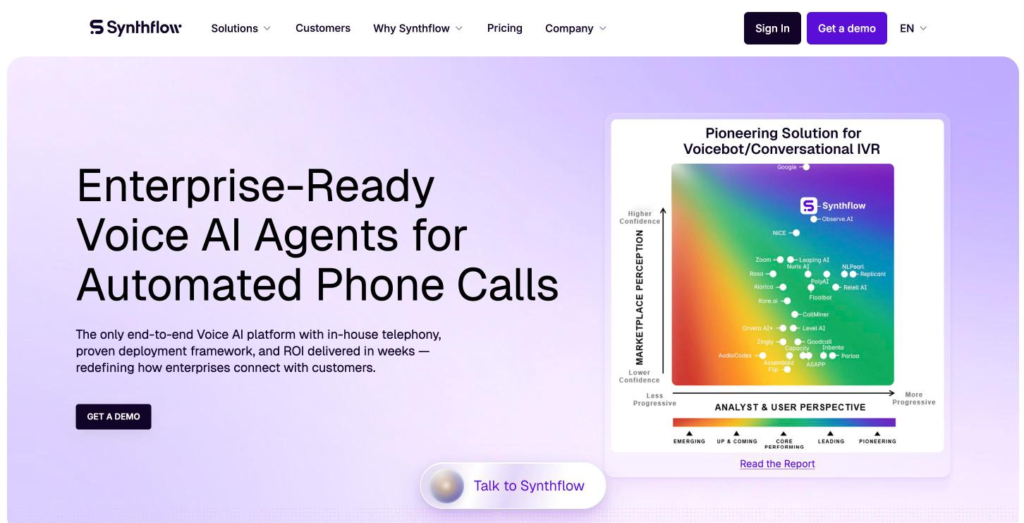
Best fit: agencies and operations teams that want the agent configured, not coded.
What it does well: the integration catalog is one of the largest here, at a stated 200 or more tools, and the custom action model is genuinely usable during a call, with returned fields becoming variables the rest of the conversation can reference.
Key features:
- HTTP custom actions that run before or during a call
- MCP actions that let the model invoke an external server’s tools
- Real-time calendar checking and booking during the call
- Post-call SMS, email and information extraction
Watch out for: the native CRM integrations are post-call. Its own pages describe contact details, case updates and custom fields updating “the moment a call ends”, which is hang-up, not mid-call. Anything that has to land while the caller is listening goes through a custom action you configure and maintain.
Pricing: only the enterprise floor is published, stated as contracts starting at 30,000 US dollars annually, scoped on volume, concurrency, telephony, integrations and security. No per-minute rate is published. As published in 2026.
Doesn’t fit if: you need to compare cost per completed outcome before a sales conversation, because there is no published rate to model with.
Public evidence: Synthflow custom actions documentation (mid-call actions and failure messages), the actions overview, the HubSpot page and the Salesforce integration page (native post-call writes), the pricing page. Checked September 2026.
Thoughtly
A voice agent platform built around a node-based flow, with mid-call actions as a first-class feature and not an escape hatch.
Best fit: revenue and operations teams that want the write, the branch and the fallback designed in the same place.
What it does well: it documents the order of operations inside a single node, so a builder can see exactly when the action runs, when variables update and when the outcome is evaluated. It also publishes a small safeguard that matters more than it sounds: when updating records it “avoids sending empty fields where supported”, which is how a partial answer stops wiping a populated field.
Key features:
- Mid-call actions and post-call automations across eight named CRMs
- Create, retrieve, update, delete and search on contacts, plus deal retrieval and update
- Inbound CRM sync that pulls records and their attributes into the platform
- Documented branching on action status, with timeout and fallback paths
Watch out for: the retry is a branch you design, not a platform behavior. Its own list of common mistakes includes “forgetting to cap retries or offer a human hand-off”, which tells you who owns that decision.
Pricing: published. A stated 500 US dollars a month entry plan, with higher tiers quoted, and usage above the monthly allowance billed in arrears. Rates as published in 2026.
Doesn’t fit if: you want a platform that decides the recovery behavior for you, because here it is part of the build.
Public evidence: Thoughtly actions documentation (mid-call order of operations, status branching, retry and fallback), the HubSpot and Salesforce CRM integration pages, the CRM sync page, the pricing page. Checked September 2026.
Aircall
A business phone system with an AI voice agent sold as a separate product on top of it.
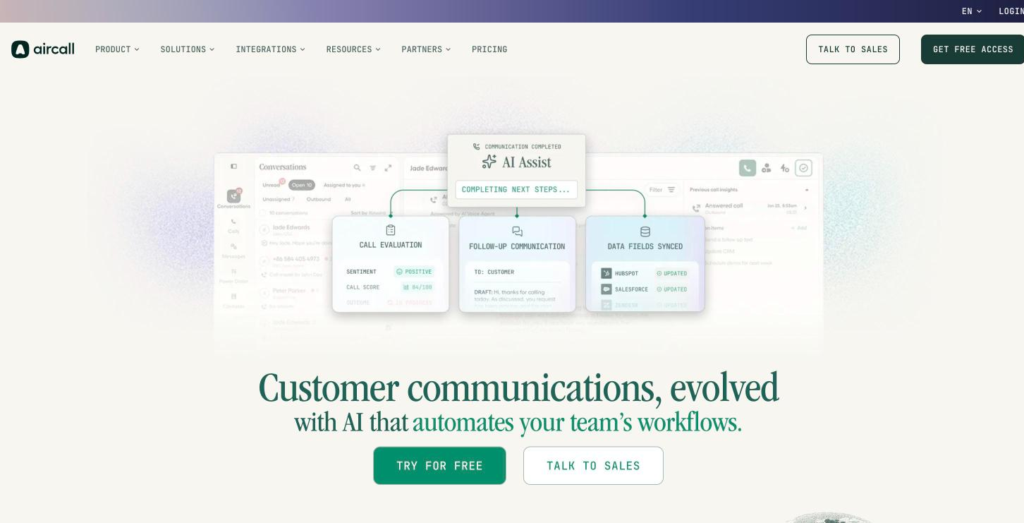
Best fit: growing teams whose phone system is already the center of the operation and who want the agent inside it.
What it does well: it runs the lookup early. An action can be set to “run automatically before the caller even finishes hearing the greeting”, matching on the phone number, and the documentation states that if no record matches “the call continues normally” instead of stalling.
Key features:
- AI Actions that execute during live calls
- Named actions across four connectors, including create and update on contacts and companies
- Configurable confirmation before an action executes
- Case creation, update and resolution on the service side
Watch out for: the headline integration count belongs to the phone system, not to the agent. The agent’s published action list covers four connectors plus native messaging, so the question for the demo is whether your specific write is on that list. The documentation is also candid that the messaging action “doesn’t report back to the agent whether the message sent successfully”, which is a useful clue about what confirmation means here.
Pricing: published. Phone licenses from a stated 30 US dollars per license per month with a three-license minimum, and the voice agent priced separately from a stated 100 US dollars monthly minimum, with per-minute rates above the included allowance. Rates as published in 2026.
Doesn’t fit if: the write you need is not one of the agent’s published actions, because the rest of the catalog is not reachable from inside the call.
Public evidence: The Aircall AI Actions support article (the published action list, caller context and the messaging caveat), the AI voice agent product page, the pricing page. Checked September 2026.
CloudTalk
A business phone platform whose AI agent handles the conversation and hands the outcome to the CRM afterwards.
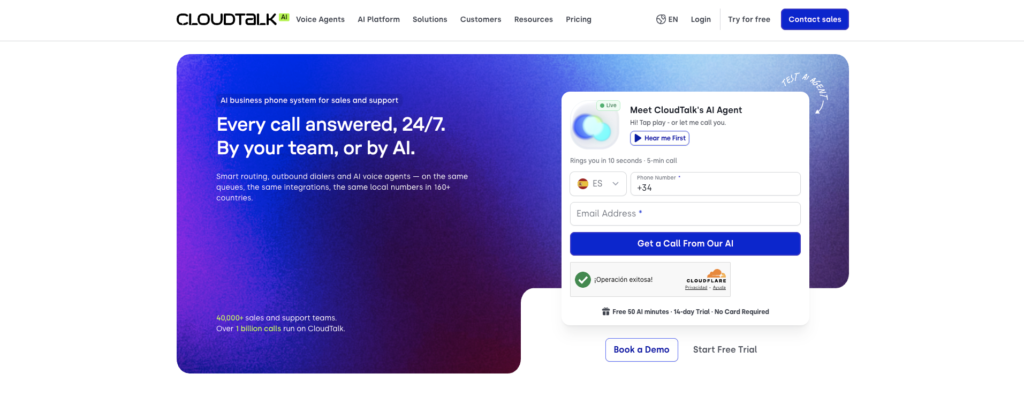
Best fit: teams that want call handling automated and the CRM kept tidy, not the CRM changed mid-conversation.
What it does well: it is unusually specific about how CRM logging goes wrong, publishing a list that includes duplicate contacts when matching is loose, appointment times arriving as text where a structured date was expected, and a disposition mapping skipped per campaign so the field is silently lost. That is more operational honesty than the category usually offers.
Key features:
- Post-call export of the agent’s structured result to seven named CRMs
- A configurable extraction step that decides which fields are captured
- Tools that make API requests to third-party systems during a call
- A spoken holding message while a tool runs
Watch out for: the native CRM path is explicitly after the call, and the in-call path is a generic API tool you build. Two different things share the phrase CRM integration on the same product.
Pricing: published. Phone plans from a stated 19 euros per user per month billed annually with a three-user minimum, and the AI agent tiers priced separately with included minutes. Rates as published in 2026.
Doesn’t fit if: the caller has to be told the record changed before hanging up, because the native path cannot do that.
Public evidence: The CloudTalk article on exporting VoiceAgent call results to CRM integrations (post-call export), the Tools for VoiceAgent article (in-call API calls), the company’s own article on CRM logging failure modes, the pricing page. Checked September 2026.
Dialpad
A phone and contact center platform with an agentic layer that executes units of work against connected systems.
Best fit: sales teams that want conversation intelligence and an agent working inside the same stack.
What it does well: it names its actions as discrete operations, not as an integration in general, and it publishes a governance layer with rules a buyer can recognize, including instructions to ask for confirmation before acting and to escalate in defined situations instead of acting.
Key features:
- Data operations such as create contact, update lead and log call note
- Ten named CRM and calendar connectors for the agentic layer
- Guardrails that define when the agent must confirm and when it must escalate
- Automatic call logging to the matching record, separate from the agentic writes
Watch out for: two mechanisms coexist and they are easy to confuse. The agentic data operations run in real time. The classic call logging happens after the call. Checking which one carries your field is the whole exercise.
Pricing: not published as rates. The pricing page describes a credit model in which a conversation is billable only when the agent retrieves information or executes a real action, without publishing the price of a credit.
Doesn’t fit if: you need to model cost per completed outcome before committing, because the unit price is not public.
Public evidence: The Dialpad help article on creating an agentic AI agent (data operations, connectors and guardrails), the contact center integrations page, the pricing page. Checked September 2026.
Cognigy
An enterprise conversational AI platform where the voice call is a flow, and the CRM write is a node inside it.
Best fit: enterprise and API-led teams standardising voice and digital on one orchestration layer.
What it does well: it is one of the more explicit platforms here about failure handling, including how the tool result returns to the agent. Its own documentation describes sending an answer back so the agent can “inform about the success, failure, or other details of the tool”, which closes the loop between the write and what the caller hears.
Key features:
- Tools on the agent node, plus a generic HTTP request node, both executing during the flow
- A named extension for the largest CRM, with create and retrieve on cases
- Required fields surfaced in the builder, with picklists pulled from the connected instance
- Call failover that can transfer the call on a runtime error
Watch out for: the timeout depends on where you are hosted, stated as 15 seconds on shared and 8 seconds on dedicated and on-premises, with a warning that raising it further “may cause delays and affect AI Agents’ performance”. A slow CRM and the wrong environment is a bad combination discovered late.
Pricing: not published. There is no public pricing page.
Doesn’t fit if: the deployment is small enough that a full orchestration layer is more process than the problem justifies.
Public evidence: The Cognigy HTTP request node reference and the support article on handling HTTP request errors (timeout, retries, error branching), the AI agent node reference, the resolve tool action reference (returning the result to the agent), the Voice Gateway endpoint reference (call failover). Checked September 2026.
PolyAI
An enterprise voice platform where agent behavior is written in code and the CRM call is a function.
Best fit: large contact center operations where the volume justifies an integration project.
What it does well: it publishes a worked example of the write itself, including the endpoint, the object and the fields, which is rarer than it should be and makes the effort estimable.
Key features:
- Functions in code that call declared HTTP endpoints, with per-environment base URLs and authentication
- Case creation and record management during calls
- Named integrations across four CRMs and a long list of vertical systems
- Documented handoff to live agents
Watch out for: what is published about failure describes operations, not runtime. It sets thresholds for when to escalate to its own support, including repeated errors that persist after retrying and an error rate above 5 percent across conversations, but the timeout and retry behavior of a single write is not described.
Pricing: not published. The page states only that ongoing use is priced per minute.
Doesn’t fit if: you need the write configured for you, because the documented route is a function someone writes and maintains.
Public evidence: The PolyAI integrations introduction and Salesforce integration page (the worked write, with endpoint, object and fields), the common issues page (operational thresholds), the pricing page. Checked September 2026.
Talkdesk
A contact center platform with an agent builder layered on top, sold around skills the agent can invoke.

Best fit: contact center organizations standardising on one vendor for routing, agents and reporting.
What it does well: it is explicit about the limits of its own structure, publishing the maximum depth of the agent hierarchy, the number of agents per level and the number of skills per agent. Knowing the ceiling before designing against it saves a rebuild.
Key features:
- Integration skills that retrieve, update and send data to third-party systems
- Six named CRM connectors, with two distinct paths into the largest one
- A preview skill type for connecting external tool servers
- Structured escalation that passes context to a human agent
Watch out for: the confirmation does not reach the caller by default. The documentation states that a skill’s output “is only accessible to the Action Agent that invoked it”, and that the agent’s instructions must say how to explain that output. Left unwritten, the write happens and the caller hears nothing about it.
Pricing: published, by seat. Stated at 85, 105, 165 and 225 US dollars per user per month across four tiers, with the agent capabilities presented inside the plans and not priced per minute. Rates as published in 2026.
Doesn’t fit if: you want per-minute economics for an automated workflow, because the published model is per seat.
Public evidence: The Talkdesk AI Agent Platform overview, the integration skill page and the core concepts page (skill output and structural limits), the pricing page. The support pages returned a 403 to a logged-out check on 29 September 2026. Checked September 2026.
Salesforce Agentforce
A CRM vendor’s own agent, with voice added, writing inside the system of record, with no connector in between.
Best fit: organizations where Salesforce is already the system of record and the goal is fewer moving parts.
What it does well: there is no integration layer to build, break or maintain for the primary case. Its own description is that voice agents can update records, create cases and trigger workflows “all in real time and within Salesforce”, and the escalation path hands the human “the full transcript and a prepopulated case already attached”.
Key features:
- Standard actions including create case, close case, update record, add case comment and log a call
- Custom actions built with flows or code
- External service actions for reaching systems outside Salesforce
- A published rate card for voice minutes and voice actions
Watch out for: native means native. A write into a different CRM goes through an external service action someone builds against an interface description, which puts you back in the same position as the developer-configurable platforms with a different bill.
Pricing: published, through a credit model. A stated 500 US dollars per 100,000 credits and 2 US dollars per conversation, with published multipliers for voice minutes and voice actions, and credits that do not roll over. Rates as published in 2026.
Doesn’t fit if: your system of record is anything else, because the advantage that makes it strong disappears the moment the write leaves the platform.
Public evidence: The Agentforce Voice product page (real-time actions), the standard agent actions reference (object coverage), the developer post on Apex action best practice (the error-handling guidance), the pricing page and the published rate cards. Named and not linked, because the vendor is on this client’s competitor list. Checked September 2026.
indigitall
Voice as one step inside a customer journey, not a standalone agent, with the record update happening as part of that journey.
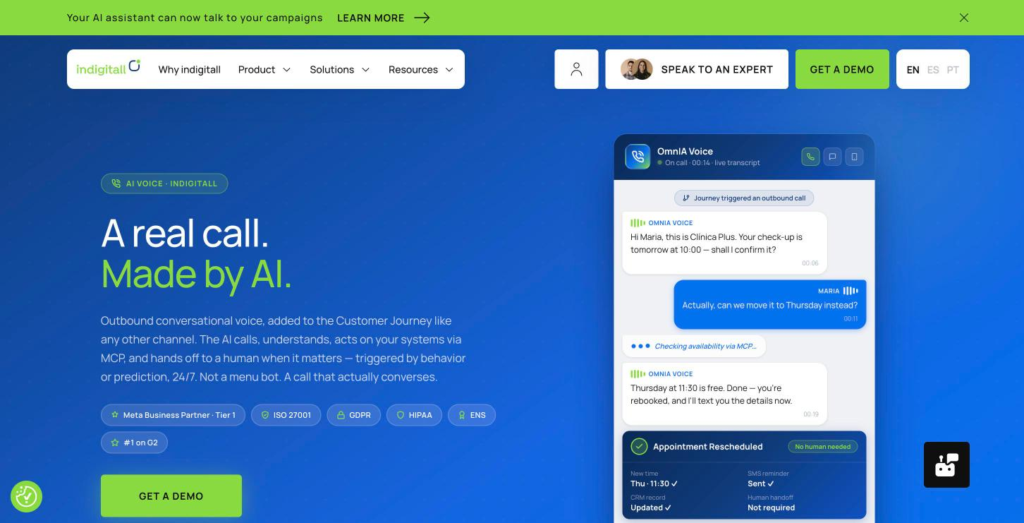
Best fit: organizations already running reminders and follow-ups over several channels that want the call to share the same customer profile and the same rules.
What it does well: the call does not start with the call. A journey step or a prediction triggers it, the agent acts on the connected systems, and the follow-up message goes out from the same place, so the record and the messaging stay in one profile instead of two.
Key features:
- Outbound calls triggered by a journey step or a prediction
- Actions on connected systems through MCP, described as fetching data, calling functions and writing results back
- Warm transfer carrying the transcript, the detected intent and the steps already taken
- The same customer profile across push, email, SMS, WhatsApp and in-app
- A published outcome split, 84 percent resolved by the agent and 16 percent escalated with context, shown on the page without a stated sample, period or method
Watch out for: the published actions are described generically, as calendar, CRM, SMS and booking. Which CRM objects and fields are connected today, and what the agent does when a write does not complete, are questions for the pilot, exactly as they are for every other row here. There is also a second surface with the same name: the reporting connector is documented as read-only by design and never changes configuration, which is the opposite of the action layer described above.
Pricing: not published. The route in is a demo and a contract, with no self-service tier.
Doesn’t fit if: the phone is the only channel you use, because the value of this shape is that the call shares a profile with the messages. It also does not fit an organization with no owned channels and no opted-in contact base, one that wants public pricing and card signup, one that needs a sales CRM or a storefront and not an engagement layer, or one whose volume is low enough that a journey platform is more machinery than the problem needs.
Public evidence: the AI voice and AI agents product pages (the mid-call action and the outcome split) and the MCP integration page (the read-only reporting surface), all linked above. Checked September 2026.
What happens when the write fails?
This is the section most category comparisons leave fragmented, and it is not a small question. A write can fail while the conversation sounds perfect, which means the failure is invisible at exactly the moment someone could still fix it.
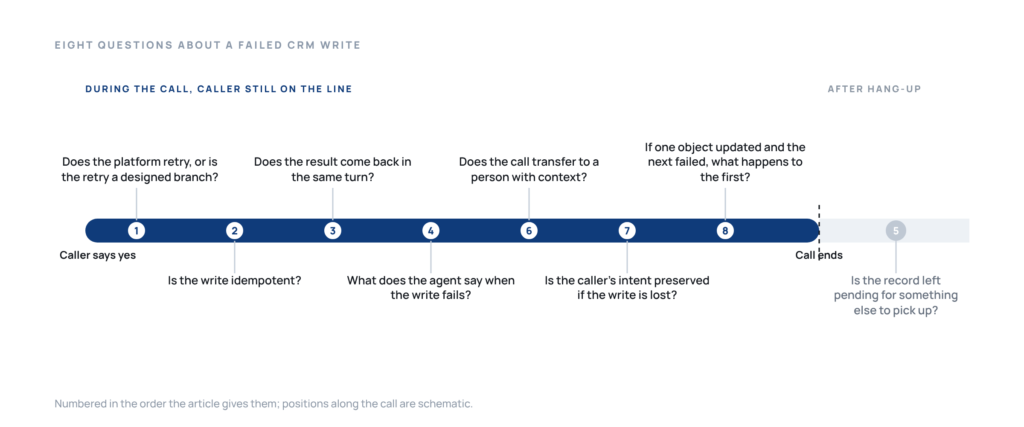
Eight questions, in the order they matter. None of them is exotic and all of them are answerable in a pilot.
- Does the platform retry, or is the retry a branch someone has to design?
- Is the operation idempotent, so that a retry updates the record it already touched?
- Does the agent get the result back in the same turn, or only a message that plays regardless?
- What does the agent say when the write does not complete, and who wrote that sentence?
- Is the record left in a pending state that something else will pick up?
- Does the call transfer to a person with the context, or does it end normally?
- Is the caller’s intent preserved even when the write is lost?
- If the first object updated and the second failed, what happens to the first?
Run those against the pages and the group separates cleanly. Cognigy publishes a timeout with numbers, a retry parameter, an error threshold, branching on the error and a call failover that can transfer on a runtime error. Retell AI publishes a configurable timeout, up to five retries with exponential backoff and jitter, and the guarantee that the error text reaches the agent so the prompt can decide what to say. Vapi publishes a timeout, an optional backoff plan and the strict error contract described earlier. Thoughtly publishes the branches, and is candid that capping them is the builder’s job.
The asymmetry is worth naming, because it cuts the wrong way if you leave it implicit. A platform that publishes its failure behavior is better documented than one that does not, which is not the same as being safer. What you can say is narrower and more useful: for a few platforms the public documentation answers several of the eight questions before the first meeting, and for all thirteen the pilot still has to test the complete path.
And one answer is the same for all thirteen. None of them documents platform-managed idempotency for a live CRM write on the pages checked. What exists is the requirement pushed back to you: Retell tells implementers that the receiving endpoint should be idempotent and recommends deduplicating webhooks on the event and call identifier, and Thoughtly tells webhook implementers to handle duplicate calls gracefully. Those are implementation requirements, not guarantees that the platform makes every CRM write idempotent. If your CRM has a unique-record rule that matters, enforcing it is yours, on every platform here.
What should you choose if…
If the system of record is Salesforce and the priority is fewer moving parts. Salesforce Agentforce writes natively inside the platform, and the published rate card makes the cost of a voice minute and a voice action easy to model before a meeting. The caveat is in its own row: a write into any other CRM is a build.
If you have engineers and a clear workflow already drawn. Retell AI, Vapi and Bland AI all put the function in your hands, and all three publish enough pricing to model the cost in advance. Retell publishes the most about failure behavior, Vapi publishes the strictest error contract, and Bland publishes the simplest per-minute economics.
If you want the agent configured for you. Thoughtly documents mid-call CRM writes with branching and fallback. Synthflow AI ships one of the largest integration catalogs, with the caveat that its native CRM writes land at hang-up and not during the call, so anything time-critical goes through a custom action.
If the phone system is the center of the operation. Aircall, Dialpad and CloudTalk put the agent where your calls already are. Check which specific writes the agent can perform, because in all three the platform’s integration count and the agent’s action list are different numbers.
If governance is what has to be signed off. Cognigy publishes one of the more explicit public failure paths here, and Talkdesk publishes its structural limits up front. Both are the fastest route through a review that asks what happens on error.
If the call is one of several channels you already use. Then what decides is which one shares a customer profile with the messages you are already sending, so the call and the follow-up do not describe two different customers. That is the shape voice inside a journey is built for. If the surrounding stack is still being chosen, that is a different decision and it should be made first.
If the write does not have to happen during the call at all. Say so out loud, because it changes the shortlist and usually the price. Plenty of workflows are perfectly served by post-call logging, and paying for synchronous writes you do not need is a common way to overspend on this category.
What does the evidence actually say today?
Four kinds of claim get mixed in this category, and separating them is most of the work.
What the answer engines say is a summary of what is published, not a test of what works. Across fifty-nine live answers to this question, the sources being retrieved are mostly comparison listicles and vendor integration pages. Evidence about failures, retries and partial writes is far scarcer than evidence about capability, which is why this guide treats the failure column as a statement about pages.
What vendor pages state is the best available evidence for most rows here, and it is genuinely uneven. Some publish object names, timeout values and retry policies. Some publish the phrase “CRM integration” and a logo wall.
What a demonstration proves is narrower than either. indigitall publishes a voice flow that checks availability, reschedules the appointment and shows the record updated. The same page displays 84 percent resolved by the agent and 16 percent escalated with context, without stating the sample, the period or the method. That is a product demonstration of the mechanism, and it should be read as one.
Adjacent integration evidence, not voice write performance
The AI agents page states support cost reduction of up to 40 percent, resolution accuracy moving from 72 percent in week one to 94 percent in week twelve, and one customer reporting a 20 percent reduction in customer service operating costs. Those describe agents acting across connected systems. None of them measures a CRM write executed during a voice call, and the page does not state the sample or the period.
That describes what a connected profile does, not what a voice write does, and the loop between data, decision and action is where that architecture is described.
What only a pilot can settle is everything in the last column of the table. Object coverage, timeout behavior under your own API limits, duplicate prevention under your own matching rules, and what the agent actually says when your CRM is slow.
“What I value most is the ability to centralize the entire marketing strategy in a single environment. It allows for orchestrating campaigns across multiple channels (email, push notifications, SMS, etc.) in an automated way, based on user behavior. The segmentation is very powerful and makes it easy to work with highly specific audiences, which directly impacts campaign performance. Furthermore, real-time personalization and the activation of automated journeys make the work much more efficient.” (Verified reviewer on Gartner Peer Insights)
A verified reviewer on Gartner Peer Insights wrote that, and it sits here because the reviewer is describing the profile that makes a call and a message belong to the same customer, which is the argument for putting voice inside a journey and not beside one.
“What I value most is the ease of integration, both for apps and websites. This allowed us to integrate the platform very easily.” (Verified reviewer on Gartner Peer Insights)
Another verified reviewer on Gartner Peer Insights wrote the second one, and it sits here with that reviewer’s own headline intact, which adds that the customer’s team still has to do the integration work. That is true of every platform in this table, and it is the honest version of the phrase “easy integration”.
Who is accountable for a record an agent changed?
Permissions, audit and ownership are separate from the platform choice, and they are the part that arrives late and stops a rollout.
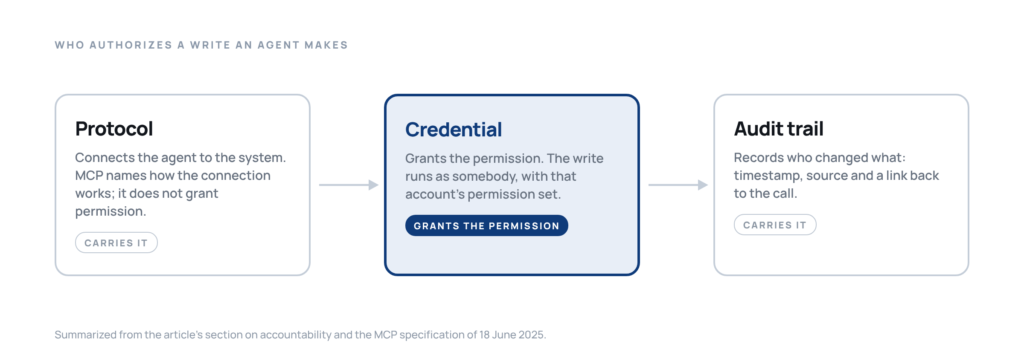
The protocol does not grant the permission. MCP is named by several platforms in this category, including indigitall, and what it is is worth separating from what it promises. The specification of 18 June 2025 describes tools as the primitive that lets models “interact with external systems, such as querying databases, calling APIs, or performing computations”, and it tells servers they must validate inputs and enforce access control. Everything the buyer is asking about sits one level up, in recommendations rather than requirements: the specification says there “SHOULD always be a human in the loop with the ability to deny tool invocations”, and that clients “SHOULD” prompt for confirmation on sensitive operations, implement timeouts for tool calls and log tool usage for audit purposes. Read that wording carefully. MCP names how the connection is made and how a tool reports an execution error. It does not tell you whether a given surface can only read or can execute a live write, and it recommends the timeout, the confirmation and the audit log without requiring them. Those stay product decisions, and they are exactly what the table asks about.
The write runs as somebody. Every platform here executes against credentials, and those credentials carry a permission set. Bland AI states the limit directly, scoping what its agent can reach to the permissions of the connected user. Retell AI publishes what a missing permission looks like in practice, a rejection naming the scope that is absent. Deciding which objects and fields the agent may touch is a CRM administration decision, not a vendor decision, and it should be made before the first pilot call, not after the first unwanted update.
The record needs to say who changed it. A field updated by an agent and a field updated by a person look identical in most CRMs unless someone configures them not to. Timestamps, a source field and a link back to the call are the minimum, and they are what makes the difference between a support question that takes two minutes and one that takes a week.
Outbound calls carry their own record-keeping. An agent that dials a list is making a telemarketing decision before it makes a CRM decision. The Federal Trade Commission’s telemarketing rules set out record-keeping and consent obligations that sit on the business placing the call, not on the vendor supplying the voice. The consent record behind the list is a thing to check before the pilot, not after it.
And the transcript is data. It contains everything the caller said, including what they said before the agent understood which record they meant. Retention, redaction and who can read it belong in the same conversation as the write, and several platforms in this table price redaction as an add-on, which is a reason to raise it early.
These questions land on different desks inside the same organization, which is why they get missed together.
FAQs: AI voice agents that update the CRM during the call
What is the difference between a CRM lookup and a CRM write-back during a call?
A lookup reads: the agent queries the CRM and uses the answer to decide what to say next. A write-back changes the record: a field is updated, a case is created, a stage is moved. Most platforms in this category do the first well, and the second is where they differ. A platform can look up a caller perfectly and still leave every change for a person to make afterwards, which is a reasonable design as long as nobody calls it automation.
Can an AI voice agent update a custom CRM field live?
Sometimes, and it depends on the route. Platforms that expose a generic function call can write anything the CRM’s API accepts, including custom objects, because you define the payload. Platforms that ship native connectors are limited to the actions the connector publishes, which usually cover standard objects and may not cover yours. The practical test is to name your field in the demo and ask which of the two routes is being used.
Does a CRM integration automatically mean the agent can write records?
No, and this is the most expensive assumption in the category. The same phrase covers a post-call export, a screen pop for a human agent, a read-only reporting connector and a live write executed mid-conversation. Ask which of the four is running, and ask it about the specific field you care about, because one product can use different mechanisms for different fields.
What happens if the CRM API times out during the call?
It depends entirely on the platform, and for most of them the public pages do not say. Where it is documented, the behavior varies from the error text being handed to the agent so the prompt decides what to say, through a designed branch that offers a call-back, to the tool failing quietly and the agent moving on. That last one is the case to ask about explicitly, because it is the one the caller never notices.
Can the agent confirm a booking or an update before the CRM confirms it?
It can, and several will if nobody stops them. The safeguard is that the result of the write returns to the agent in the same turn and the agent is instructed to speak only after it arrives. A message played while the request is running is not a confirmation: it plays whether the write succeeds or fails. If the caller is going to be told something is done, the design has to make that sentence conditional on the result.
Which platforms let developers define their own CRM functions?
The developer-configurable group in this table is built around that idea, and every other group offers some version of it as an escape hatch: a generic HTTP node, a custom action, an external service action. The difference is what you get without writing one. The question to ask is how many of your required writes need a custom function, since every group here offers them in some form.
Is an MCP connector read-only or action-capable?
Both exist, and the name does not tell you which. The protocol defines tools that can call APIs and change things, and it leaves the confirmation, the timeout and the audit log to the implementation. The same vendor can ship a read-only reporting connector and an action layer that writes to live systems, both correctly described as MCP. Ask which surface is being connected, and ask what it is permitted to do.
What should a live pilot test before production?
Five things, and none of them is conversational quality. Write the correct field on an existing record, and check that a second one was not created. Confirm the result to the caller only after it lands. Fail deliberately, by pointing at a record the agent cannot update, and listen to what it says. Hit your own API limit and see what happens to the call. And read the record afterwards to check that it says an agent changed it.
What does a voice platform with CRM integration cost?
Three pricing shapes coexist in this table and they are not comparable line by line. Developer-configurable platforms publish per-minute rates, sometimes with a monthly platform fee and with transfers billed separately, which makes the cost easy to model and easy to underestimate, because the engineering that builds the write is not in the number. Business phone platforms price per license per month, so the agent arrives as an add-on to a seat count you already have. Enterprise suites and the CRM vendor’s own agent quote, which means the number depends on volume and on what else you buy. The comparison that holds is cost per completed outcome rather than cost per minute: a cheap call that ends with a task in somebody’s queue has moved the spend to payroll.
Which CRMs are actually documented for a live write?
Salesforce and HubSpot are the two that appear most often as named connectors across this table, and the CRM vendor’s own agent is the case where there is no connector at all because the agent runs inside the record. Beyond those two the picture thins quickly. The reliable test is whether the vendor publishes the objects and fields the agent can write, and whether a custom field is among them, not whether your CRM appears in an integrations logo wall. Platforms that expose a generic function call can write anything the CRM’s API accepts, because you define the payload. Platforms that ship a fixed action list can write what is on the list and nothing else.
How do you roll one of these out without breaking the CRM?
In an order that puts the write last, not first. Start read-only, with the agent looking up the record and using it to decide what to say, and check that it matches the right contact rather than creating a second one. Then enable a single write on a single field, on a sandbox or on a limited segment, and watch what happens when the CRM is slow. Then add the confirmation rule, so the agent speaks only after the result comes back. Only then widen the action list. The step that gets skipped is the credential review, and it is the one that stops the rollout later: the write runs as somebody, that somebody has a permission set, and somebody else has to be able to see afterwards which records an agent changed.
Why are Five9 and Genesys not in this comparison?
Both do appear in answers to this specific question. They are not rows in this comparison because the evidence set used here did not establish a verified, public path to a CRM write during the call, and listing them with an empty cell would say something about their products that their own pages do not say. Their omission is a scope and evidence decision, not a claim that they cannot perform the capability. If either is on your shortlist, apply the same four questions to it: does the agent read the right record, does it execute an authorized write at the right moment, does the result return before the agent speaks, and what happens when it does not.
Is call summarization the same as updating the CRM?
No, and conflating them is how a buying process ends up satisfied with the wrong thing. A summary is text produced after the conversation and attached to a record. An update is a field whose value changed. Most platforms in this table do summarization well and describe it prominently, because it is easier to build and it demonstrates nicely. A summary in the notes field does not move a deal stage, does not correct an address and does not create the case that triggers the next workflow. If the outcome you need is a downstream process firing, ask which field changes, not what the notes will say.
Can a small business use any of this?
Yes, and the limiting factor is rarely the price. The developer-configurable platforms are the cheapest to start and the most expensive to finish, because somebody has to build and own the write path, and in a small team that somebody usually has another job. The packaged agent builders and the business phone platforms are the realistic route: the integration arrives configured, the action list is fixed, and the ceiling is that the fixed list is what you get. The question to ask before signing is whether the one write you actually need is on that list today, because the gap between a published action and a custom one is the gap between buying and building.
About the Authors