indigitall Omni AI
 Start chat with AI agent
 Speak with AI voice agent
 Free demo

 Contact Sales












Revolutionize Your WhatsApp Strategy: Introducing Carousel Templates on indigitall



In the world of messaging, visual impact is everything. We are thrilled to announce a powerful new addition to the Indigitall platform: WhatsApp Carousel Templates.
Gone are the days of sending static, single-image messages. With this new release, you can now create rich, swipeable card experiences directly within WhatsApp, allowing you to showcase multiple products, services, or stories in a single, cohesive message.
Here is everything you need to know about this new feature, the value it brings to your campaigns, and how you can start using it today.
Product Features: What’s Under the Hood?
The new Carousel tool is designed for flexibility and ease of use, located directly within your WhatsApp Templates menu. Here is what you can build:
- Multimedia Headers: Every card in your carousel can feature a rich media header. You can choose between Images or Videos to grab your user’s attention instantly. (Pro tip: We recommend a 1.91:1 aspect ratio for the best look).
- Multi-Card Layouts: You are not limited to one screen. You can add multiple cards to a single message. The system ensures a professional look by enforcing a consistent layout across all cards—meaning every card will share the same media type and button structure.
- Interactive Buttons: Drive action directly from the carousel. You can configure up to three types of buttons for your cards:
- Quick Reply: Let users respond with a single tap (max 25 characters).
- Phone Call: Direct users to a dialer with a pre-filled number (max 20 characters).
- URL: Send traffic to your website or product page.
- Dynamic Variables: Personalize your message bodies using numeric, sequential variables (e.g., {{1}}, {{2}}) to tailor the content for every recipient.
The Value: Why Use Carousels?
Why switch from standard messages to Carousels? The benefits are clear:
- Higher Engagement: Users love to swipe. Carousels are inherently interactive, encouraging users to spend more time exploring your content than they would with a static text block.
- Better Real Estate: You can convey much more information without cluttering the chat screen. Instead of sending five separate messages, you send one clean, organized stream of cards.
- Visual Consistency: By enforcing consistent layouts (same button types and media formats across cards), Indigitall ensures your brand presentation remains polished and professional, avoiding “broken” or messy chat interfaces.
- Action-Oriented: With support for direct URLs and “Call Now” buttons, you shorten the path to conversion, whether that’s buying a product or booking a consultation.
3 Use Cases to Try Today
Not sure where to start? Here are three powerful ways to utilize Indigitall’s new WhatsApp Carousel Templates:
1. E-Commerce Product Collections
Stop sending links to a generic category page. Instead, send a “New Arrivals” carousel.
- Card 1: Summer Dress (Image) + Price + “Shop Now” URL button.
- Card 2: Beach Sandals (Image) + Price + “Shop Now” URL button.
- Card 3: Sun Hat (Image) + Price + “Shop Now” URL button.
- Result: The customer sees the specific items, swipes through the lookbook, and clicks to buy the exact item they like.
2. Travel & Tourism: Destination Discovery (Visual Showcase)
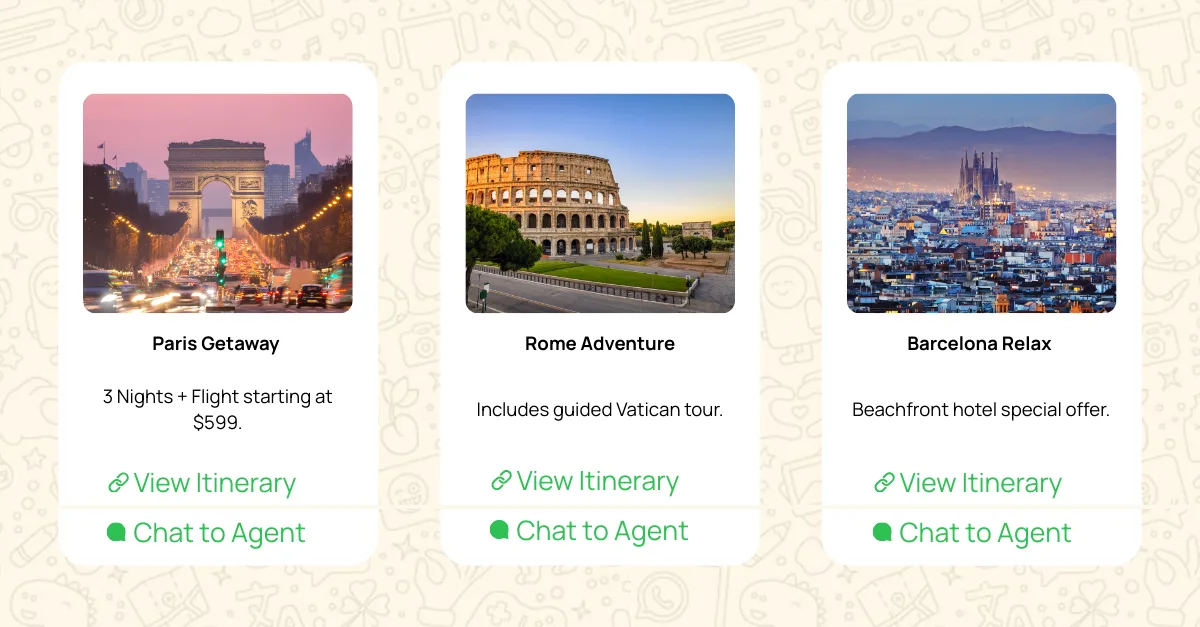
Travelers often struggle to decide where to go next. Instead of sending a single generic offer, inspire them with a carousel of your top seasonal destinations.
- Card 1: Paris Getaway (Image of Eiffel Tower)
- Body: “3 Nights + Flight starting at $599.”
- Button: “View Itinerary” (URL)
- Card 2: Rome Adventure (Image of Colosseum)
- Body: “Includes guided Vatican tour.”
- Button: “View Itinerary” (URL)
- Card 3: Barcelona Relax (Image of Sagrada Familia)
- Body: “Beachfront hotel special offer.”
- Button: “View Itinerary” (URL)
- Why it works: The user can visually compare different vacation vibes (Romantic vs. Historic vs. Relaxing) without leaving the chat, increasing the likelihood of finding a trip that resonates.
3. Banking: Choosing the Right Credit Card (Educational/Product Selection)
Financial products can be complex. Use a carousel to simplify the comparison between different card tiers or account types, allowing customers to self-select the right product.
- Card 1: The Traveler (Image of Gold Card)
- Body: “Earn 2x miles on every flight.”
- Button: “Apply Now” (URL)
- Card 2: The Saver (Image of Blue Card)
- Body: “0% APR for the first 12 months.”
- Button: “Apply Now” (URL)
- Card 3: The Student (Image of Green Card)
- Body: “No annual fees + cash back on books.”
- Button: “Apply Now” (URL)
- Why it works: It breaks down dense financial information into bite-sized highlights, making the decision process less intimidating and more direct.
Bonus: Food & Beverage: Digital Menu Board
Hungry customers don’t want to read a PDF menu. Show them exactly what they can eat right now.
- Card 1: The Spicy Deluxe (Video of burger assembly)
- Body: “New jalapeño topper. Limited time only.”
- Button: “Order Pickup” (Quick Reply)
- Card 2: Loaded Fries (Video of cheese being poured)
- Body: “Add to any meal for just $2.”
- Button: “Order Pickup” (Quick Reply)
- Card 3: Choco-Shake (Video of shake)
- Body: “Cool down with our double fudge blend.”
- Button: “Order Pickup” (Quick Reply)
- Why it works: Leveraging video headers in the carousel makes the food look irresistible, while the Quick Reply button removes friction from the ordering process.